

meta data for this page
Arguments for "exec"
The arguments of “exec” say how to substitute the directory name and file name it receives into the dynamic variables of the attached job. These arguments are complicated; since Hoku 3.1, an editor in the exec, mkdir and if modules helps you create them.
The four symbols
| Symbol | Meaning |
|---|---|
$D$ | the name of the input directory |
$F$ | the name of the input image file |
:: | a file separator: a backslash (Windows) or a forward slash (macOS) |
$I$ | an iteration parameter, defined within the exec module |
Wherever exec finds $D$, it substitutes the directory name, and wherever it finds $F$, it substitutes the file name.
Example
To give the directory and file name to ReadImage, put $input$ in ReadImage's filename argument, and $D$::$F$ in exec's “input” argument. Here, $title$ was also entered in Show, so exec's argument window has two labels, “input” and “title”:
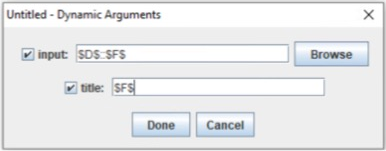
For “input”, $D$::$F$ means the file in the directory. For “title”, only the file name is used. On Windows, with this directory and file:
| Directory name | C:\Image Files\Smith_093r |
|---|---|
| File name | Smith_093r+MB940IR_016_F.tif |
the exec arguments translate to:
| Argument | exec entry | Result |
|---|---|---|
| input | $D$::$F$ | C:\Image Files\Smith_093r\Smith_093r+MB940IR_016_F.tif |
| title | $F$ | Smith_093r+MB940IR_016_F.tif |
exec takes the command from the attached job, replaces $input$ and $title$ with these values, and runs the new command. It waits until the job is completed, then passes a “completed” message to the next module, and waits for the next directory and file name.
The iteration parameter
$I$ iterates a single number over a range: the job runs once for each number. It needs a modification that says which numbers; see Iteration.