Table of Contents
Hoku Layout
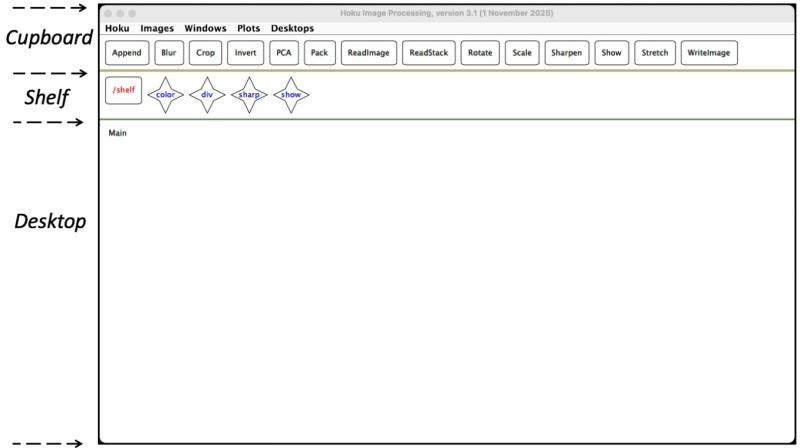
The Hoku window has a MenuBar at the top and three regions below it. From the top, they are the Cupboard, the Shelf and the Desktop.
Cupboard
The Cupboard holds the modules. You drag modules down to the Desktop and assemble them to form a job. Which modules you see depends on the Hoku level.
More: Cupboard
Shelf
The Shelf is where you store jobs to use at a later time.
More: Shelf
Desktop
The Desktop is where jobs are created, modified and executed. You can create several Desktops. Hoku saves your Desktops when you quit, so when you return, your Desktops are as you left them.
More: Desktop
MenuBar
The MenuBar above the Cupboard has five menus: Hoku, Images, Windows, Plots and Desktops.
More: MenuBar